This sponsored post is in partnership with Best Buy
Cut the Cord: Transform Your TV with Google Chromecast Streaming Media Player
Are you tired of skyrocketing cable bills that seem to climb higher with each passing year? You’re certainly not alone. Millions of households worldwide are grappling with the frustration of paying exorbitant fees for hundreds of channels they never watch. The traditional cable model is becoming increasingly outdated, prompting a massive shift towards more flexible, affordable, and personalized entertainment solutions. This growing movement, affectionately known as “cord-cutting,” has opened up a world of possibilities for families seeking greater control over their viewing experience and their budgets.
Today, we’re diving deep into one of the most effective and user-friendly tools leading this revolution: the Google Chromecast Streaming Media Player. This ingenious device isn’t just another gadget; it’s your gateway to unlocking a vast universe of digital content, transforming any conventional television into a powerful smart entertainment hub. Say goodbye to restrictive schedules and limited choices, and hello to on-demand access to your favorite movies, shows, music, and more, all streamed effortlessly to the biggest screen in your home.
What is Google Chromecast? Your Smart TV Upgrade, Simplified
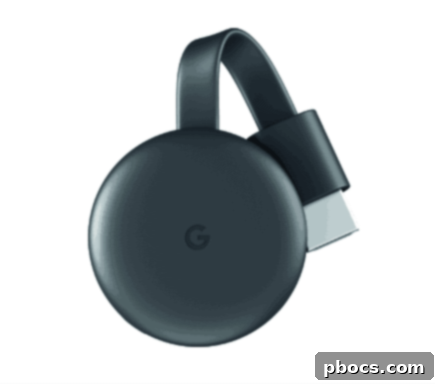
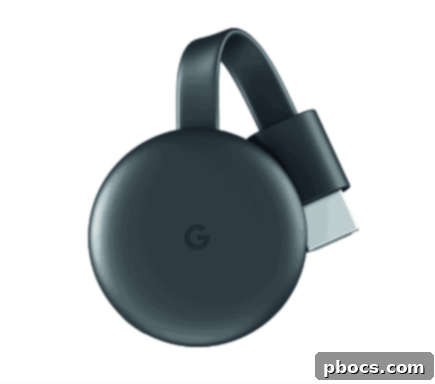
At its core, the Google Chromecast is a compact streaming media adapter designed to bring the power of the internet directly to your television. Roughly the size of a USB stick, it plugs discreetly into your TV’s HDMI port, becoming an invisible yet indispensable part of your home entertainment system. Once connected to your home Wi-Fi network, Chromecast acts as a bridge, allowing you to “cast” content from your smartphones, tablets, and computers directly to your TV screen. This means your mobile device effectively becomes a powerful remote control, giving you seamless command over what you watch, listen to, and share.
Unlike bulky set-top boxes or complex smart TV interfaces, Chromecast champions simplicity. There are no intricate menus to navigate on your TV, no separate remote to juggle. The entire experience is managed through the apps you already love and use on your personal devices. This intuitive design makes it incredibly accessible for everyone in the family, from tech-savvy teens to grandparents just looking to enjoy their favorite shows.
Unlock Endless Entertainment: Key Features and Benefits
1. Universal Content Compatibility: Stream Anything, Anywhere
One of Chromecast’s most compelling advantages is its unparalleled versatility in content delivery. It allows you to watch movies, binge-worthy TV shows, live sports, breaking news, YouTube videos, and even personal photos and videos streaming directly on your TV. Whether it’s a blockbuster film from your favorite streaming service, a cooking tutorial from YouTube, or precious family memories stored on your phone, Chromecast ensures it all looks stunning on the big screen.
The beauty lies in its device-agnostic approach. Your smartphone, tablet, or even your laptop running the Chrome browser can become a casting source. This means every family member can share their preferred content, turning your TV into a truly shared entertainment hub. Imagine sharing your holiday photos with everyone in the room, or letting your kids stream their favorite educational content without monopolizing your phone.
2. A Vast Ecosystem of Apps: Your Favorites, Amplified
Chromecast works seamlessly with an astounding array of streaming applications you already know and love. Forget about being limited to a handful of pre-installed apps; with Chromecast, you gain access to thousands of entertainment options. Enjoy TV shows, movies, videos, songs, games, and much more from over 2000 compatible apps. Popular choices include:
- Video Streaming: Netflix, YouTube, YouTube TV, HBO NOW (now Max), Disney+, Hulu, Amazon Prime Video, Apple TV+, Peacock, Sling TV, Paramount+, and countless others covering every genre imaginable.
- Music Streaming: Spotify, Pandora, Google Play Music (now YouTube Music), Apple Music, and many more, turning your TV into a giant Jukebox for parties or casual listening.
- Photo/Video Sharing: Google Photos allows you to display your cherished memories in vivid detail, sharing them with friends and family effortlessly.
- Browser Casting: Beyond dedicated apps, you can also cast any tab from your Google Chrome browser on your computer directly to your TV, opening up endless possibilities for web-based content, presentations, or even casual browsing on a larger display.
This extensive compatibility means your entertainment options are virtually limitless, ensuring there’s always something new and exciting to discover, tailored to every taste and interest within your household.
3. Effortless Setup and Intuitive Control
Getting started with Chromecast is remarkably simple. Just plug the device into an available HDMI port on your TV, connect it to a power source (usually via a USB cable and adapter), and follow the straightforward setup instructions using the Google Home app on your smartphone or tablet. Within minutes, your TV will be ready to cast.
The control mechanism is equally intuitive. Once connected, a small “Cast” icon will appear within compatible apps on your mobile device. Tapping this icon instantly streams the content to your TV. The best part? Your phone isn’t tied up. You can continue to use your device for texting, browsing, or other tasks while your chosen content plays seamlessly on the big screen. This dual functionality offers unparalleled convenience, preventing interruptions and keeping your personal device free for its primary uses.
4. Hands-Free Entertainment with Voice Control
Elevate your streaming experience even further by combining Chromecast with a Google Home smart speaker or display. This powerful duo enables hands-free voice control over your entertainment. Imagine settling down on the couch and simply saying, “Hey Google, play The Mandolorian on Disney+ on the living room TV,” and watching your show instantly appear.
Voice commands extend beyond just playing content. You can pause, rewind, fast-forward, adjust volume, or even switch between apps, all without lifting a finger. This integration makes your home entertainment system feel truly futuristic and incredibly convenient, especially when your hands are full or the remote is out of reach.
5. An Economical Path to Smart Entertainment
One of Chromecast’s most appealing attributes is its incredible affordability. Compared to investing in a brand-new smart TV or subscribing to expensive cable packages, Chromecast offers an extremely cost-effective way to upgrade your entertainment setup. Its budget-friendly price point means you can easily get one for every TV in your house, transforming every screen into a smart hub without breaking the bank.
This affordability, combined with the power to access thousands of free and subscription-based streaming options, makes cutting the cord not just a possibility, but a smart financial decision for many families. It’s an investment that pays dividends in both entertainment value and long-term savings.
Why Google Chromecast is the Perfect Cord-Cutting Solution
Beyond its impressive features, Google Chromecast stands out as an ideal solution for modern households for several reasons:
- Cost Savings: Dramatically reduce or eliminate your monthly cable bill, redirecting those savings to other priorities or investing in premium streaming subscriptions you genuinely use.
- Transform Any TV: Breathe new life into older, non-smart televisions, giving them all the capabilities of the latest models without the need for a costly upgrade.
- Portability and Flexibility: Its compact size makes it perfect for travel. Take your entertainment with you to hotels, vacation rentals, or a friend’s house and instantly set up a streaming station wherever there’s an HDMI port and Wi-Fi.
- Always Evolving: As a Google product, Chromecast benefits from continuous software updates, ensuring new features, improved performance, and expanded app compatibility, keeping your device current and relevant for years to come.
- Family-Friendly: With its ease of use and ability to cast from multiple devices, it’s a fantastic solution for households with diverse entertainment preferences, allowing everyone to enjoy their chosen content without conflict.
Getting Started with Your Google Chromecast
Setting up your Chromecast is a breeze, designed to get you streaming within minutes:
- Plug It In: Insert your Chromecast into an available HDMI port on your television. Connect the USB power cable to the Chromecast and then to a power source (either a USB port on your TV or the included power adapter plugged into a wall outlet).
- Download Google Home App: On your smartphone or tablet, download the Google Home app from the App Store (iOS) or Google Play Store (Android).
- Follow Setup Instructions: Open the Google Home app, which will guide you through connecting your Chromecast to your home Wi-Fi network and linking it to your Google account.
- Start Casting: Open any compatible streaming app on your mobile device (e.g., Netflix, YouTube). Look for the “Cast” icon (a small rectangle with a Wi-Fi symbol in the corner), tap it, and select your Chromecast device. Your content will instantly begin playing on your TV!
Important Considerations:
**While Google Chromecast provides incredible value, please remember that subscriptions are often required to view certain premium content from services like Netflix, Disney+, or HBO Max. Furthermore, web-based services and content, including the core functionality of Chromecast, require a stable high-speed Internet service to ensure a smooth and enjoyable streaming experience. Some services or features may also require a specific subscription or compatible device beyond the Chromecast itself. Always check the requirements for your desired content or features.
Embrace the Future of Home Entertainment with Chromecast
The days of being shackled to expensive cable contracts are rapidly fading. With the Google Chromecast Streaming Media Player, you have the power to curate your own entertainment universe, tailored precisely to your preferences and budget. It’s an accessible, powerful, and incredibly user-friendly device that brings the best of online content directly to your living room, effortlessly transforming any TV into a dynamic smart hub.
If you’re ready to ditch the cable bill and embrace a more flexible, personalized, and affordable way to watch, listen, and play, the Google Chromecast is your ideal partner. Discover the freedom of streaming and experience entertainment on your terms. Find your Google Chromecast today at Best Buy and start your cord-cutting journey!
Find more at g.co/chromecast.